Write a useful center
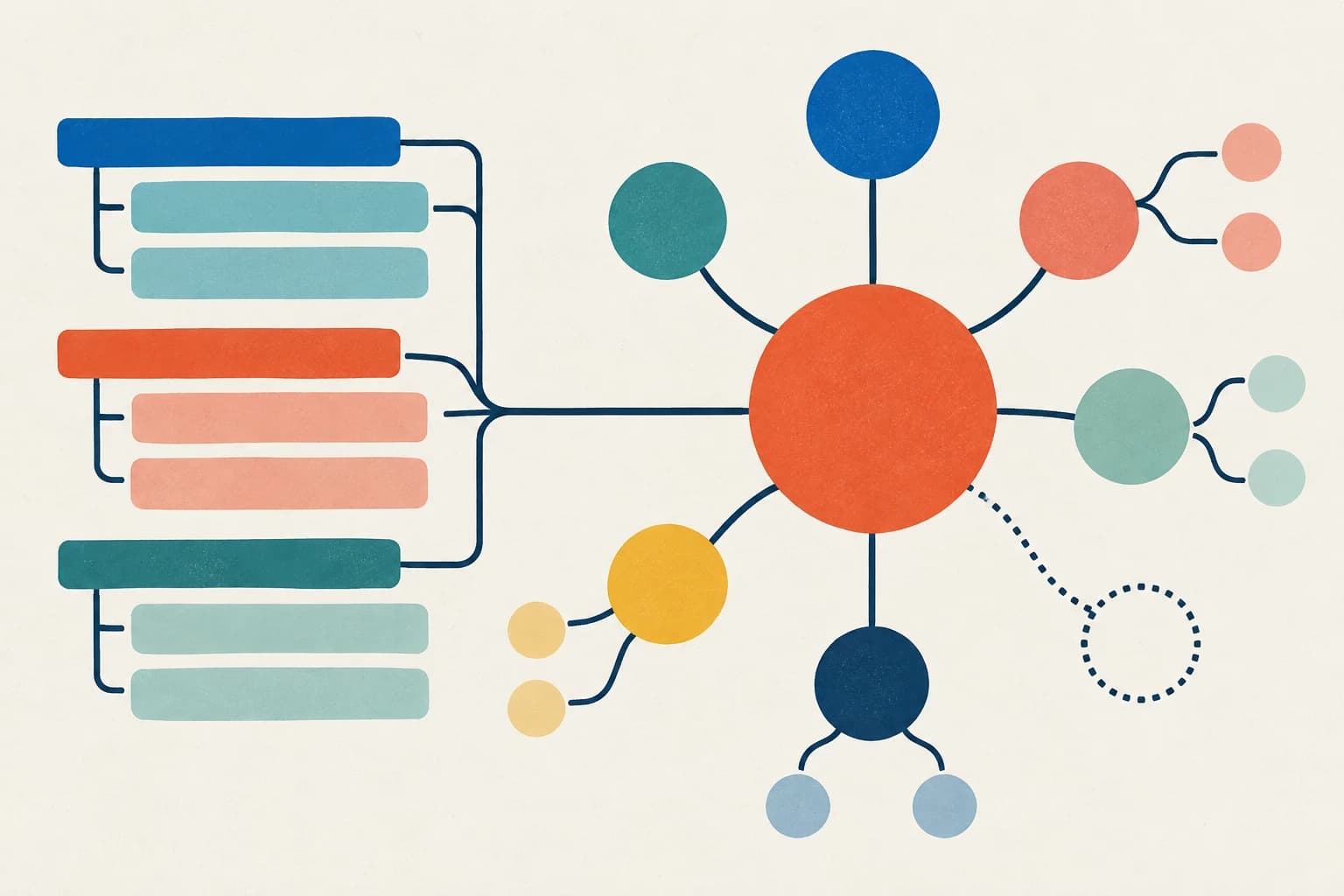
The mind-map maker works from an outline whose indentation shows nested ideas. Start with a title for the central topic, then add major branches and indent supporting ideas beneath them. The structure is explicit, so the tool draws what you provide rather than interpreting an open-ended paragraph.
For a research plan, the center might be “How do new customers find their first useful action?” First-level branches could cover discovery, setup, and early value. Under setup, indent questions about access and import. A focused center keeps the branches connected to a question someone can investigate.
Keep branch levels consistent
Use one indentation level for each parent-child relationship and avoid mixing examples with top-level themes. If “Setup” and “Security requirements” are both major concerns, give them equal level. Put supporting questions beneath the relevant branch so readers can tell how they relate.
An outline can become deep quickly. Stop adding levels when another branch no longer changes the discussion or action. A mind map should help readers explore the main idea, not hide it under a thicket of detail.
Choose the visual arrangement
The free tool previews a selected mind-map layout from your outline. Try different available styles and look at how well the branches fit. A symmetrical arrangement may be easy to scan, while a more compact form can accommodate a set of related ideas with less empty space.
Look for branches with long labels, too many siblings, or a parent whose children are not truly related. The output can help you see the structure, but it cannot resolve whether your categories make sense. Revise the outline first when the content relationship is the problem.
Preserve what is still uncertain
A brainstorm often includes proposals, questions, and confirmed facts together. Mark those differences in the wording so readers do not mistake every branch for an agreed plan. You might prefix an item with “Open:” or “Test:” when its status matters to the discussion.
If several people contributed, keep their original phrasing long enough to check that the map represents their ideas fairly. A concise label can be useful, but do not rewrite a participant’s uncertainty into a confident statement without asking.
Continue in the editor when needed
The browser tool is good for a quick outline-to-map pass and can export PNG or SVG without signup. Open the result in the editor when you want additional styling, content-panel edits, more layouts, or a saved multi-diagram board. The text input gives you a direct starting point; the editor adds room for continued work.
Before sharing the map, ask a reader to describe what the central idea and each first-level branch mean. If the relationship is unclear, rename a branch or move it under a better parent. A useful mind map makes the structure easier to discuss without pretending that every connection is already settled.