Use lanes only when ownership matters
A swimlane flowchart separates work by role or team. It is useful for a repair request because a requester, coordinator, and technician perform different actions and exchange information. If the process belongs to one person and ownership never changes, lanes may add visual furniture without helping. Start by identifying the handoffs that readers need to understand.
Choose roles rather than individual names. “Requester,” “Facilities coordinator,” and “Technician” remain valid when staff changes. If a role is temporarily combined, the same person can occupy two lanes without changing the underlying responsibility. State whether the diagram shows intended ownership or current practice; otherwise readers may treat a proposed process as an approved one.
Separate actions by the person who performs them
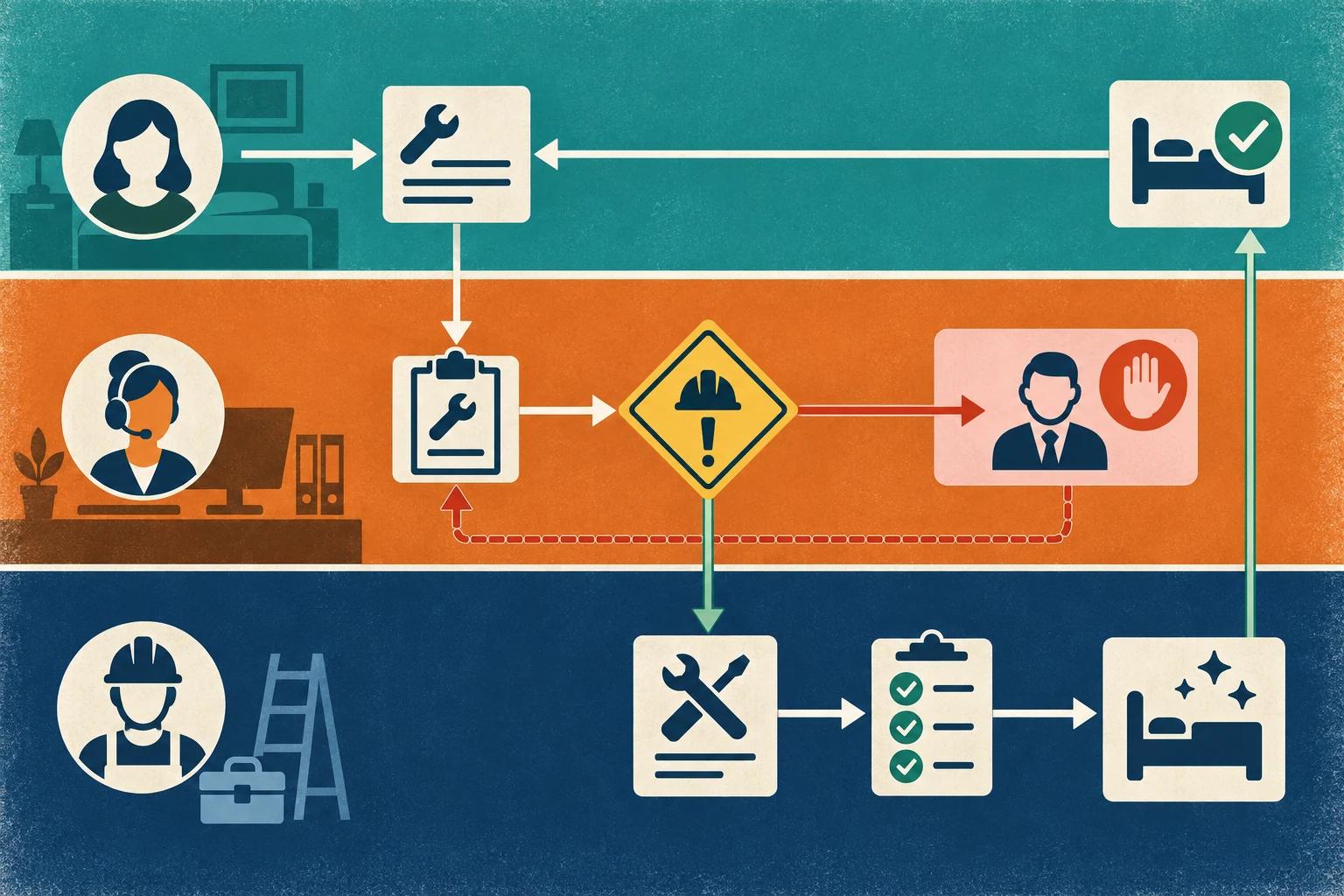
The requester submits a location, description, and access constraint. The coordinator checks urgency, confirms contact details, and schedules a visit. The technician inspects the issue, repairs it or identifies a part requirement, and reports the result. Place each action in the lane of the person who performs it, not the person who receives the notification.
Use a decision diamond in the coordinator lane for “Does this create a safety concern?” If yes, the coordinator follows the emergency route and alerts the designated supervisor. If no, the request enters normal scheduling. The lane makes authority visible, but the decision rule still needs a clear definition and policy reference.
Make each transfer carry useful information
A connector crossing from requester to coordinator should represent a complete handoff: submitted request with location and description. From coordinator to technician, include the issue, access instructions, and urgency. Label connectors when the payload is not obvious. “Send ticket” says where it goes but not whether the next person has enough to act.
Show what happens when information is missing. The coordinator asks the requester for a detail and holds scheduling; the return connector leads back to the request rather than ending in a vague “pending” box. When the answer arrives, make the re-entry point clear. Return paths are essential in a swimlane because ownership often returns to an earlier role.
Walk through a repair request
A staff member reports that a meeting-room door will not latch and notes that the room is booked that afternoon. The coordinator checks whether the issue affects safe use. If uncertain, they consult the facilities lead; if the room must be taken out of use, they arrange an alternate room and notify the affected staff. The technician then inspects the latch.
If a replacement part is needed, the technician records the part and estimate, and the coordinator schedules a return visit. After repair, the technician verifies operation and tells the coordinator. The coordinator confirms the room is available and closes the request with the reporter. This walkthrough exposes multiple transfers that a simple list might collapse into “repair door.”
Keep lanes readable and proportionate
Too many lanes make the chart wide, while too few can hide a meaningful handoff. Group roles that truly share responsibility, but do not put the requester and technician in one lane merely to save space. If several specialist roles are involved only in exceptions, show a separate escalation lane or linked procedure.
Align steps across lanes when timing matters, but do not imply that parallel placement means simultaneous work unless it does. Use cross-lane arrows that avoid crossings and keep branch labels near the connectors. If the flow becomes dense, split normal repair handling from emergency response while clearly signaling the boundary between the maps.
Validate the lanes with the people in them
Ask a requester, coordinator, and technician to trace the same case. Each should recognize their actions and see what information they receive. Differences reveal hidden assumptions: perhaps technicians currently contact requesters directly, while the proposed process assigns that communication to the coordinator. Decide whether the map documents practice or proposes a change before sharing it.
Review the chart when responsibilities or escalation policy change. A lane diagram can become outdated even when the sequence appears correct because the owner has moved. Add a process owner and reference to the current repair policy. The lanes should reduce handoff ambiguity, not imply that role boundaries are permanent or that every request follows one identical route.
Outline the requester, coordinator, and technician actions in Autodiagram, indenting decision outcomes beneath the correct role. Choose a process layout and edit handoff labels to state what information travels between lanes. After the repair team validates ownership and return paths, export PNG for the workshop board or SVG for its process guide.