State the task each option must serve
A three-option matrix gets crowded quickly if it compares every feature someone can imagine. For a staff handbook, the decision may be how people find routine instructions, learn a new procedure, and access guidance away from a network connection. Those jobs create relevant dimensions; a list of media features does not.
Name the audiences and moments of use. A new staff member may need a guided orientation, while an experienced colleague needs a fast lookup during a shift. A web guide, printable booklet, and short video each help differently. If one format cannot serve every use, the decision may be a primary format plus a small companion resource.
Choose a small set of independent criteria
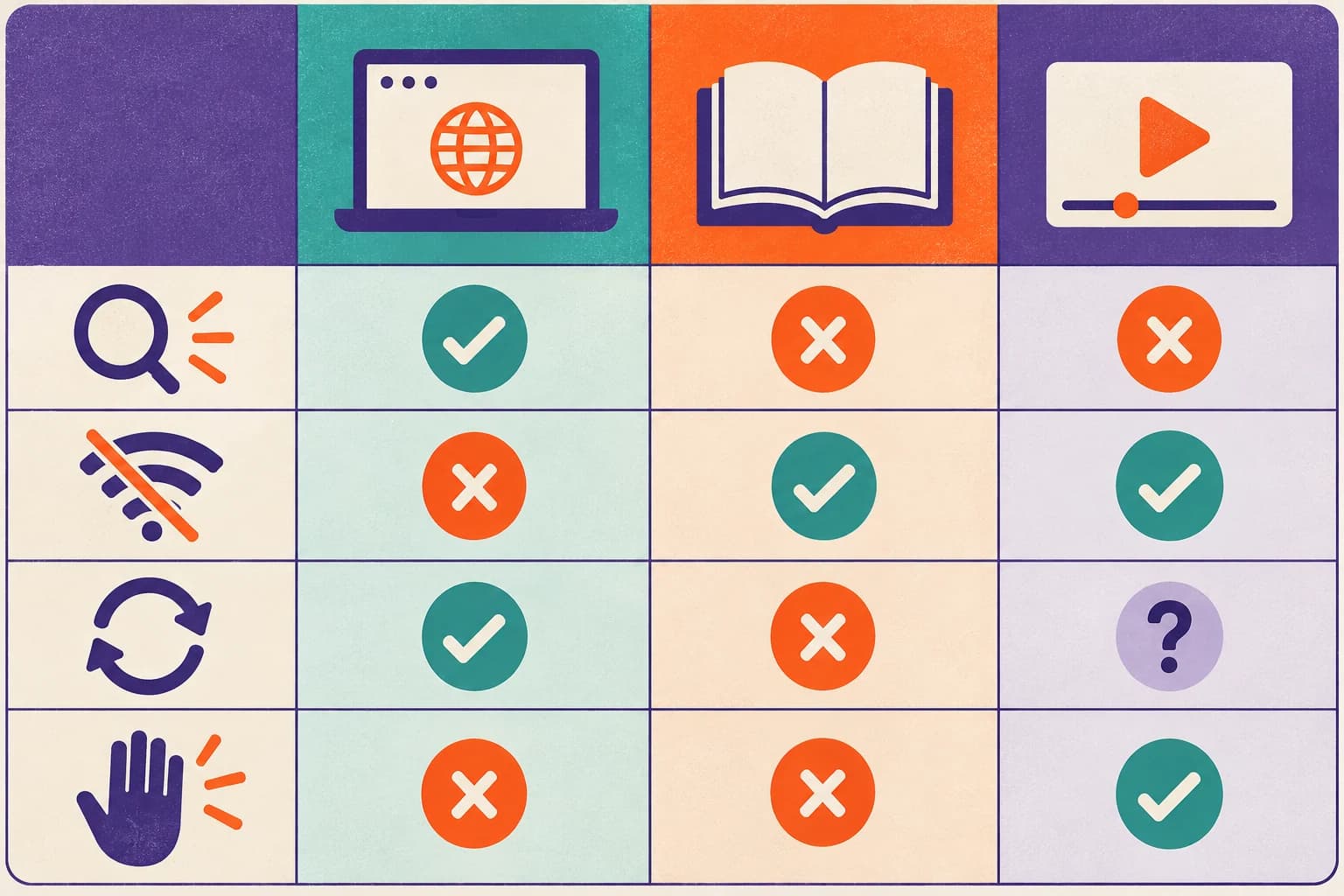
Use criteria such as lookup speed, ease of updating, offline access, accessibility support, and suitability for demonstrating a physical action. Avoid overlapping labels like “easy” and “convenient,” which invite the same judgment twice. Five criteria are usually enough to expose the core tradeoffs without making the matrix unreadable.
Write the question behind each row. For offline access, ask whether instructions remain available during a shift with unreliable connectivity. For updates, ask how quickly a policy change reaches the version people use. Clear questions force the team to gather comparable evidence instead of filling cells with impressions.
Keep each cell concise and evidence-aware
A web guide may support search and frequent updates, but requires a device and connectivity. A booklet can be used offline, though revisions may leave outdated copies in circulation. A video can demonstrate a motion, but may be slower to consult for one detail and needs captions or a transcript. State these tradeoffs in parallel language.
If the team has not tested a format, mark the cell as an assumption or open question. A pilot could ask staff to find a procedure using each format, then note where they hesitate. Do not use precise scores for qualities the team has not defined. A comparison should make uncertainty more visible, not hide it behind a polished grid.
Walk through a real handbook task
Suppose a staff member needs to locate the steps for closing a room at the end of a shift. A web guide may be searchable, but the staff tablet could be checked out. A booklet at the room may be immediately available but stale if the procedure changed last month. A video might clarify how to secure a mechanism but be cumbersome for checking a short list.
The example reveals that formats can complement each other. A concise checklist at the point of use could link to the current web guide, while a short demonstration covers the physical motion. That hybrid recommendation is grounded in distinct tasks. It is also a larger maintenance commitment, so show who will update each artifact and retire outdated versions.
Reduce density with a decision summary
If cells become paragraphs, move detailed reasoning into notes and keep the matrix to a phrase plus a clear status. Use a short caption to explain the strongest fit for each audience need. Avoid tiny type, narrow columns, and unexplained symbols. If a reader must zoom in to compare, split the matrix or remove a low-value criterion.
A summary can say: web guide for current reference, booklet for offline checklist, video for demonstration. This is not a universal ranking; it is a mapping from task to medium. State any constraints—budget, translation, update ownership—beside the recommendation so the audience sees what must be true for it to work.
Make the decision and maintenance plan
After reviewing the matrix, record the selected combination and the reason. Assign an owner for content updates, accessibility review, and version retirement. If the team chooses a booklet, define how old copies are removed. If it chooses a video, identify who updates it when a procedure changes. Format selection creates ongoing work that belongs in the decision.
Invite a staff member who performs the closing task to try the chosen format. Ask them to locate the instructions without coaching and point to a step that remains unclear. Update the comparison if the pilot changes an assumption. A compact matrix helps the team choose among options while preserving the evidence and obligations behind that choice.
Enter web guide, booklet, and video as options in Autodiagram, with the handbook tasks as comparison dimensions. Select a comparison layout and edit each cell to keep evidence and assumptions distinct. If the grid becomes dense, shorten labels before shrinking type. Export SVG for the staff handbook proposal or PNG for a review slide.