Make the hierarchy answer a structural question
A hierarchy is useful when readers need to see how broad responsibilities divide into smaller parts. For a nonprofit program, the question might be: how do program goals connect to workstreams, deliverables, and accountable roles? This is different from a workflow, which describes what happens over time, and different from an org chart, which emphasizes reporting relationships.
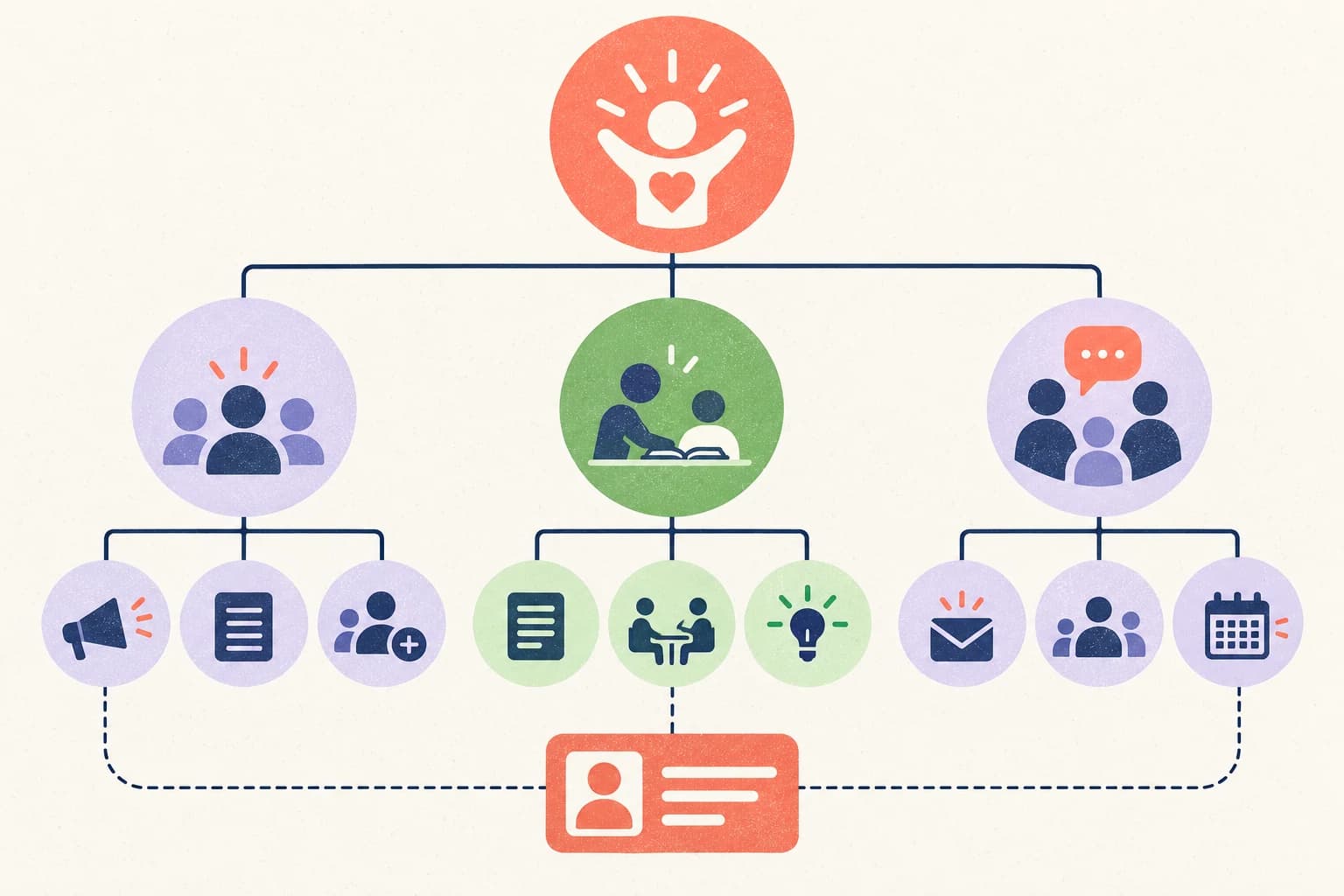
Write the highest-level item in language that names the outcome or mandate. “Increase access to after-school tutoring” gives the map a purpose. Starting with the team name may be accurate administratively but does not tell a volunteer why the work exists. Put department ownership in a separate cue if it matters to the audience.
Choose a consistent grammar for each level
A clear hierarchy uses comparable siblings. Under the program goal, branches might be “student recruitment,” “tutoring delivery,” and “family communication”—all workstreams. Under tutoring delivery, children might be “match tutors,” “prepare sessions,” and “track attendance”—all responsibilities. Avoid putting a role, a metric, and a task at the same depth.
Name each level before filling every branch. A simple legend can explain that level one is the outcome, level two is a workstream, and level three is a deliverable or responsibility. Consistency helps readers predict what a neighboring node means. If one branch cannot follow the same pattern, it may represent a different relationship and should be moved or split.
Walk down from goal to work
Take the goal “more students can access tutoring.” The recruitment workstream produces a list of students who want support and a schedule of available tutors. Delivery produces matched sessions and a process for missed appointments. Family communication produces invitations, progress updates, and a contact route for concerns. The branches connect a broad goal to work a team can plan.
Now test one leaf: “confirm weekly availability.” Who does it, and what larger deliverable does it support? If the path reaches a goal without any work that can reasonably influence it, the hierarchy is incomplete. If a detailed email template appears four levels down, ask whether a reader needs that level here or whether it belongs in an operations guide.
Check for empty or overloaded levels
An empty branch may signal that a goal is aspirational but lacks an assigned body of work. An overloaded branch may hide several unrelated activities. Ask whether “family communication” should separate enrollment, scheduling, and progress updates because they serve different moments. Add a level only when it improves navigation or clarifies responsibility.
Avoid balancing branches just for visual symmetry. One workstream may have two deliverables and another six; that difference can be real. Instead, help readers find each item through clear labels and spacing. If a long branch dominates the canvas, create a detail view linked from the overview rather than shrinking all nodes to fit.
Validate the structure with program owners
Bring the draft to someone who coordinates tutoring and someone who delivers it. Ask them to trace a deliverable to the program goal and identify where shared work sits. If they disagree about which workstream owns a task, capture that decision rather than quietly choosing the most convenient branch.
A hierarchy can become stale when services expand or accountability shifts. Assign a program owner to review the goal, workstream labels, and shared links after a major change. Keep the map focused on structural relationships; use a separate schedule for dates and a separate process map for handoffs. Readers can then move between views without expecting one diagram to explain every aspect of the program.
Draft the nonprofit hierarchy as an indented outline in Autodiagram: program outcome, workstreams, then deliverables. Choose a hierarchy layout and edit shared responsibilities into cross-references rather than duplicated branches. Adjust font size and palette for volunteer use, then export SVG for the program guide or PNG for a planning session.